Showing posts with label Facebook Tricks. Show all posts

Sep 15, 2012

How to Send free SMS from Facebook

How to Send free SMS from Facebook


Hello friends,I hope that the title had made you click on this post and check out that is it really possible to Send free SMS from Facebook. Yeah!! it's true!! You can even send International messages to your friends. Well, this Facebook provides an instant messaging service which takes only few seconds to reach its destination. The only drawback is you can send only 100 characters SMS and you can send only 4 SMS per day.

Steps to Send free SMS from Facebook:-
Login into your Facebook Account and Go to this Facebook Chat App.

Just click on Allow.

Select the country you want to send SMS.


Enter the Mobile Number of the SMS receiver.

Enter the text you want to send and click on Send SMS.

Another free Facebook SMS Sending Service- Free SMS on Facebook
Enjoy!!!

Feel Free To Ask Anything.
Hope you like it.
Enjoy and don’t forget to comment.
Sep 14, 2012

How to Remove Facebook Timeline

How to Remove Facebook Timeline...ahhh Now its Possible

We all know that Facebook Implemented Timeline Feature for all people. Some people liked it and some people really hated it. Firstly people wanted timeline, but after sometime, they started neglecting it and thumbs down for Timeline!! Even Facebook did not give any response on how to Disable Facebook Timeline. Well, Many of my friends too asked me that how can they Remove Facebook Timeline. However, this is now possible using a trick. In this series, I am going to shareHow to Remove Facebook Timeline!!!


How to Remove Facebook Timeline:

For Mozilla Firefox:

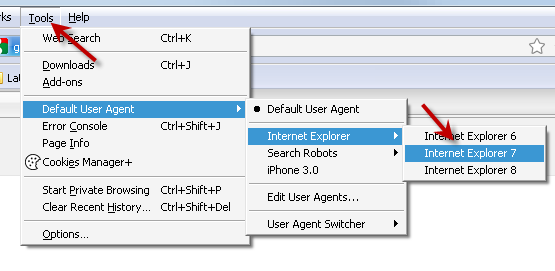
Open Firefox Browser and Add this User Agent Switcher Addon. After installing it, Restart your browser.


Now go to Tools


Now go to your Facebook Profile. You might be seeing that the page is having errors and unnecessary spaces between them. So follow the link and Install FB Purity Extension in your Firefox Browser.


So, that's all! Refresh your Facebook profile. And you will be seeing that your old profile look is back!


For Google Chrome:

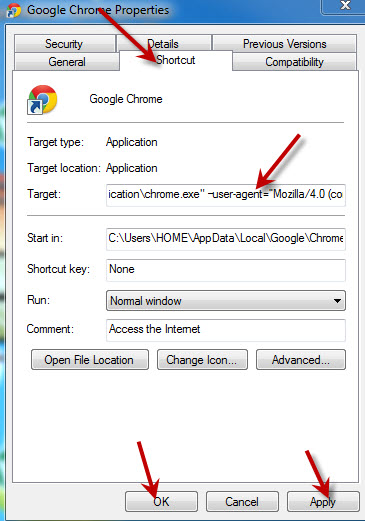
Go to your desktop. Right Click on Google Chrome's Shortcut and Click on Properties.

Now properties Window will open. Go to Shortcut Tab. Now you need to add some changes in theTarget.
Paste the following code in the Target window after the : “C:\ProgramFiles\Google\Chrome\Application\chrome.exe”

Code to add For Windows Vista & Windows 7 Users.
–user-agent=”Mozilla/4.0 (compatible; MSIE 7.0; Windows NT 6.0)”Code to add for For Windows XP Users.
–user-agent=”Mozilla/4.0 (compatible; MSIE 7.0; Windows NT 5.1)”
Remember, you need to leave space between:“C:\Program Files\Google\Chrome\Application\chrome.exe”–user-agent=”Mozilla/4.0 (compatible; MSIE 7.0; Windows NT 6.0)”

Apply it and Hit OK.


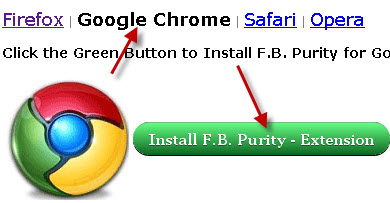
Now go to your Facebook Profile. In this you will be seeing that you are having errors in your timeline. So Now you need to install FB Purity in your Chrome Browser.


Refresh your Profile page (Ctrl+F5) !!

that's all!! You got rid of Facebook Timeline in Chrome too!!

Feel Free to ask anything if you face any problem.
Hope you like it.
Enjoy and don't forget to share.

How to Access Facebook Without Internet Connection


How to Access Facebook Without Internet Connection

Hello Friends,As you all know Facebook is becoming larger and larger as the time has been passing. There are so many users using Facebook. Nowadays, Facebook is no more limited to Chatting or meeting people living far away from us. In fact, it has became part of our Commercial and Professional Life. Facebook has been the part of interacting with people and nowadays it has been a common need for all of us.
Every user would like to checkout his account everyday so as to checkout his friends, chatting with them,reading their profiles and so on. However, Facebook has taken a step to serve all Indian Users by providing a service in which they can use Facebook on their Mobiles without any GPRS/Internet Connection. Now it provides a facility to use Facebook even on Nokia 1100 with does not GPRS facility. So, it's a really great service by which you can access Facebook without Mobile Internet or GPRS facilities.


How to Access Facebook Without Internet Connection:-

To serve all Indian users with this facility, Facebook got into a partnership with Fonetwish. If you wish to use all the features from your mobile like Status Updating, Seeing Wall posts, Notifications,etc. then you need to subscribe to the Fonetwish premium plan by clicking here.

If you want to access this service, You need to dial *325# from your phone.
You will shown up with the confirmation and the company providing you this service i.e. Fonetwish.
Now you will be prompted to enter your Facebook Username and Password.
Now, you can do many things using this service like Status Updating, Seeing Wall posts, Notifications,etc.!!!

If you subscribe Facebook by Fonetwish, you will be charged Rs.1 per day with which you can access unlimited Facebook for a Single Day.
Later on you can even unsubscribe to this service by dialing *325*22# from your Mobile.

However, this service is currently enabled only for Airtel,Aircel and Tata Docomo Users. Later on, Facebook & Fonetwish will add more service providers to its list.

Feel Free to ask anything if you face any problem.
Hope you like it.
Enjoy and don't forget to share.

Massage

if you give us comments (and u want that my name not show then u choose Anonymous in Comments as drop down list) then write a massage and click on Publish.

Latest Software